Split expenses without splitting friendships
The smartest app to share expenses with friends, roommates, or while traveling. Simple, fast, and always in sync.
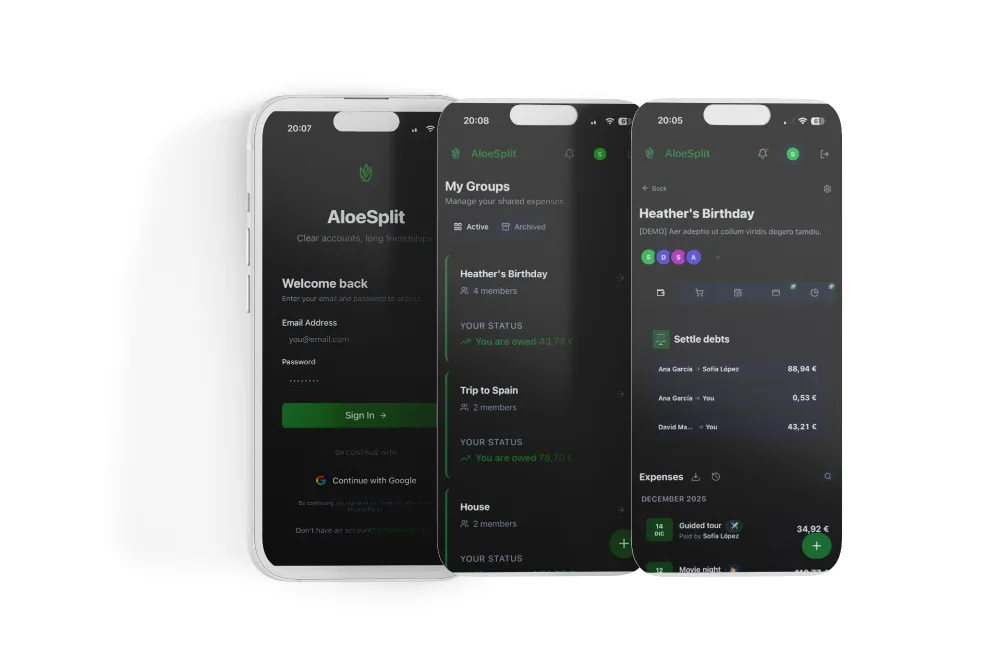
Why choose us?
We believe splitting expenses should be simple, fair, and without surprises.
Unlimited groups
Create as many groups as you need without paying extra. Trips, apartment, couple, friends... no limits.
No ads
Your experience matters. That's why we removed ads from the equation.
Recurring expenses
Set up subscriptions that add automatically. Included for free.
Ghost users
Add people to the group without them having an account. They can claim it later.
Custom categories
Organize your expenses with icons and colors from day one.
Secure sync
Modern technology to keep your data always protected and up to date.
How it works
Three steps and done. No complications.
Create a group
Invite friends, roommates, or family with a simple link.
Add expenses
Record who paid and split however you want: equally, by percentage, or exact amounts.
Settle debts
Our algorithm calculates the most efficient way to settle accounts.
Install as a Native App (PWA) or wait for store release.

Android
In developmentWe are working hard to bring the app to the Play Store very soon.

iOS
PlannedComing after the Android release.
Install Now (PWA)
No need to wait. Install AloeSplit directly from your browser for a native experience.
- In Safari, tap the "Share" button
- Select "Add to Home Screen"
- In Chrome, tap the menu (three dots)
- Select "Install App"
Everything you need
Features designed to make your life easier.
Flexible splitting
Split equally, by percentages, or exact amounts.
Quick payment
Settle debts instantly with Bizum, PayPal, or Revolut.
Multi-currency
Expenses in different currencies with automatic conversion.
Offline Mode
Works without internet. Syncs when you reconnect.
Push notifications
Stay updated when someone adds an expense.
Recurring expenses
Set up subscriptions that add automatically.
Shopping list
Shared list that converts to an expense with one click.
Custom categories
Organize expenses with icons and colors of your choice.
Simple and transparent
Start free, upgrade when you need to.
Free
- ✓ Unlimited groups
- ✓ Up to 5 custom categories
- ✓ Flexible splitting
- ✓ Multi-currency
- ✓ Offline mode
Pro
Choose the plan that works best for you
- ✓ Everything in Free
- ✓ Unlimited categories
- ✓ Budgets and limits
- ✓ Upload receipts (5GB included)
- ✓ PDF and CSV export
- ✓ Advanced statistics
- ✓ Priority support
I'm a solo developer with a big mission. Your Pro subscription helps me keep the servers running, improve the app, and continue offering a free version with no ads. Thank you for your support. 💚
Frequently Asked Questions
Got questions? We've got answers.
Does it work without internet?
Yes! AloeSplit works fully offline. All your changes are saved locally and sync automatically when you reconnect.
How do I invite my friends to a group?
Generate a unique invitation link from the app and share it via WhatsApp, Telegram, or any other app. It's instant.
Is my data secure?
Absolutely. We use Supabase with row-level security (RLS) policies. Only group members can see their data.
Can I use multiple currencies in one group?
Yes. You can add expenses in any currency and AloeSplit automatically converts them to the group currency using updated exchange rates.
What's the difference between Free and Pro?
Free includes all essential features with unlimited groups. Pro adds budgets, PDF export, and unlimited categories.